
The email marketing world has seen a flurry of deliverability issues in 2026: Brands who notice that their emails are going to their own spam folder and/or notice their results are significantly below their own historical benchmarks. I usually start with the same 5 steps, so I’m creating my first and only blog post to share for easy access 🙂
NOTE: If you’ve already done these, you may need deeper expertise than me! I think Laura Atkins from Word to the Wise is a great resource.
Before I dive into the 5 tips, 3 Pre-Requisites:
- You should be sending (to a good chunk of your list) at least once every 30 days. Inbox providers have short memories, so if you aren’t sending regularly, you get the “cold” shoulder again and even a few unsubscribes when you haven’t had much volume recently can look pretty bad.
- You should only add contacts to your email list with their permission. It’s 2026. I know you get lots of “surprise” emails in your own inbox, but if you’re asking about deliverability, you’re learning why we experts preach permission and opt-in list growth only.
- If you’re sending from a new-to-you IP address or domain, make sure you’ve worked with your email platform support team to “warm up” your new account. They usually do that for you and most marketers are on an already warm, shared IP address.
- Bonus note: Your inboxes may be the toughest to get into! If you’re sending From newsletters@acme.com, your own domain (acme.com) will sorta recognize that it didn’t send that email. That’s what Authentication is for (more on that below), but it can still be a trip up. Be sure your emails are *also* going to spam for other folks.
If you’re doing all the above and are still noticing a dip in open/click rates and/or notice your emails going to junk for other recipients, try these 5 steps to evaluate if you have an inbox placement issue:
1. Are you seeing higher than average hard bounce, unsubscribe, or complaint rates? Bounce and unsubscribe rates should be under 1% and spam complaint rates should be under 0.1%. If they’re higher, you probably need to clean your list out. Somehow, either folks are getting on your list that don’t want to be there or are dead weight.
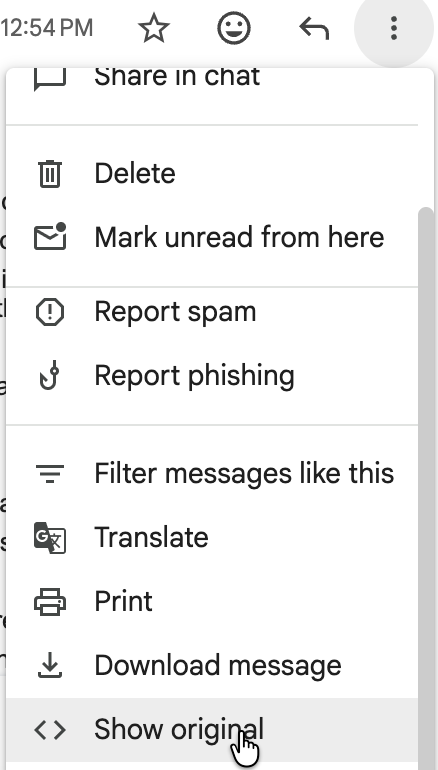
2. Have you double checked that your Sender Authentication is (still) passing? To do this, if you have received one of your recent emails in a Gmail or Google for Business inbox, go to the 3 dots at the top right of the email and choose Show Original. You should see SPF, DKIM and DMARC all passing. If not, work with your IT team to update your domain registrar. If they’re not sure how, ask your email platform support team!

3. If those look good, copy the IP address you see there (that’s what your email platform is using for your sends) and check it out (free) at SenderScore.org. Does the IP have super high volume or have dips in score in the last 30 days? What other domains are sending from your IP address? If this is the issue, you can take it up with your email platform’s support team to see if they can either kick off a bad performer or move you to a safer IP address. You can also check your SenderScore for your domain’s score. If your domain is the problem, it’s on you (not your email platform) to fix your content or behavior (see #5 below + my soapbox about permission and cleaning up your list above).
4. Are your open/click rates particularly low at any specific domain(s) like aol.com or hotmail.com? If you find an issue, reach out to your email platform’s support team. You may actually have gotten blocked and need to be removed. (NOTE: You can be blocked or blacklisted which are both terrifying or more likely your emails may just be getting shuffled to the junk folder.)
Even if you have a B2B list, usually there are at least a few consumer domain subscribers and they can indicate if you had a blockage at one of those. Deliverabilty is both easier and harder for B2B brands. Easier because you don’t have to get past a Yahoo or Gmail spam filter and unsubscribes may not affect your “reputation” as much. Harder because you have way more domains and systems at work and it’s a lot harder to spot and resolve issues.
5. You can buy tools (fairly reasonably) like GlockApps or MailGun to see within 24 hours after send if your emails likely went to spam. They offer a send or two for free to start and it may be worth signing up/trying. That’s at least a faster/more conclusive alert if something’s off. They have some tools to test before you send as well, which could give you insight as to whether your content is what’s getting you blocked. If it’s not your content, we gotta go back to the drawing board and figure out what made Gmail, AOL, Yahoo or Hotmail are mad at you 🙂
Dig in on that stuff first and then if you need more help, check out Laura or contact me and I can introduce you to an expert pal to take next steps from there.
Happy sending, all,
Jess